
The Moveee team
Free coaching · a real route for every ride
Squinting at a 13-inch laptop while you ride is a waste of a good trainer session. Put the ride on the telly and it changes the whole thing — a real road across 55 inches actually pulls you along. Here's how to get indoor cycling on a smart TV in 2026: which setups are rock-solid, which are fiddly, and the simplest big-screen route of all.
The key thing to understand: what pairs the trainer
Your smart trainer connects over Bluetooth, and most smart TVs can't do that pairing themselves. So the reliable pattern is: let a laptop or phone pair the trainer and run the app, and use the TV as the screen. Once you frame it that way, the options fall into a clear order.
Laptop → HDMI → TV
BestThe most reliable big-screen setup. The laptop (Chrome/Edge) pairs your trainer over Bluetooth and does the work; the TV is just the monitor. Trainer connection is rock-solid.
Cast a browser tab from a laptop/phone
GoodChromecast or AirPlay a tab to the TV. Convenient, but casting can add lag or drop — a cable is steadier for a whole session.
The smart TV's own browser
DependsA few TVs have a usable browser, but almost none support Web Bluetooth, so the TV usually can't pair the trainer itself. Check before relying on it.
Android TV box + browser
DependsSome Android TV devices run Chrome and Bluetooth; results vary by box. Worth trying if you have one.

The simplest big-screen setup, step by step
- Sit a laptop near the trainer and open a browser trainer app (Chrome or Edge).
- Run an HDMI cable from the laptop to the TV, and set the TV as the display.
- Pair your trainer to the laptop over Bluetooth.
- Ride. The big screen shows the road; the laptop handles everything else.
A long HDMI cable costs a few euros and removes every "it lagged" and "it disconnected" problem casting can introduce. For a full session, wired wins.
A real road on the big screen, free
Because Moveee Indoor runs in a browser tab, it goes to the TV with nothing extra to install — mirror or extend the laptop's display and your ride fills the screen. It rebuilds your own saved routes in 3D from real map and elevation data, drives your trainer's resistance from the real gradient, and saves rides with full power data to your Moveee plan and Strava. It's free while in alpha.
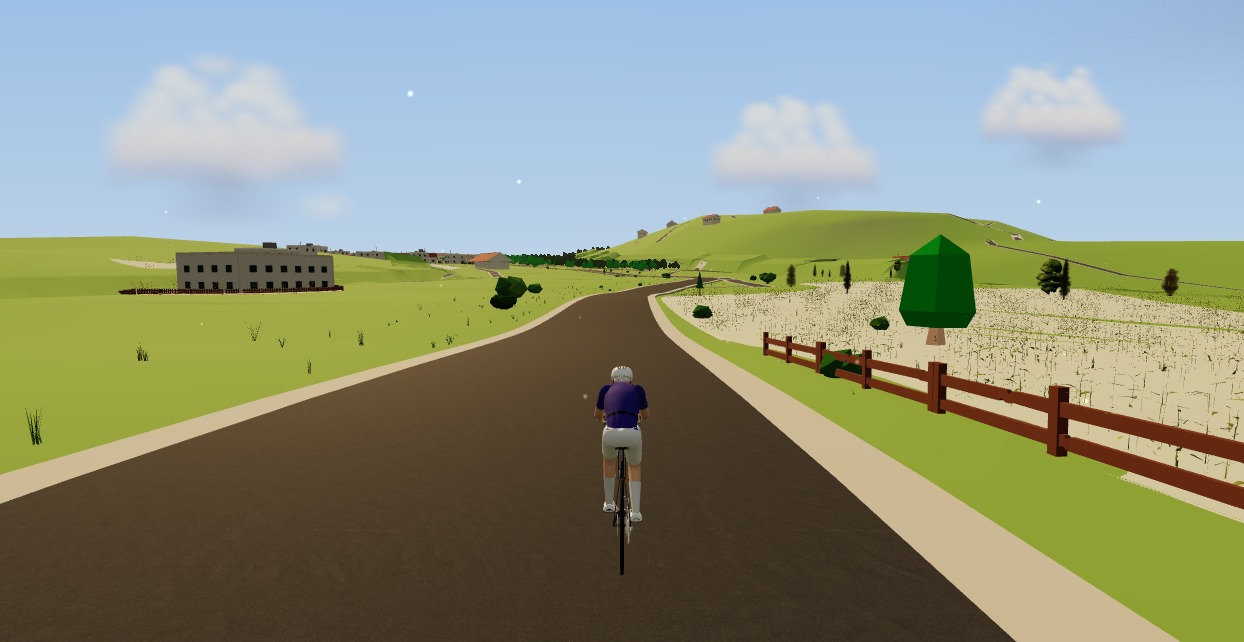
Big screen, real road, no download. Point an HDMI cable at the telly and go.
Sources 5
Where this article summarises a study, the study itself is linked — not a write-up of it.
- 1 Web Bluetooth · W3C Web Bluetooth Community Group · 2024
- 2 Web Bluetooth API — browser compatibility · MDN Web Docs · 2025
- 3 Fitness Machine Service 1.0 · Bluetooth SIG · 2017
- 4 Cast a Chrome tab on your TV · Google Chromecast Help · 2025
- 5 Use AirPlay to stream video or mirror the screen of your iPhone or iPad · Apple Support · 2025
Your own roads, indoors, in a browser tab
Moveee Indoor pairs your smart trainer over Bluetooth and rebuilds a route you have saved as a 3D road — real gradients, ERG for the intervals, and the ride saved with full power data. Nothing to install. Free while it is in alpha.
Start an indoor rideKeep reading

Zwift on iPad? A browser alternative for tablets that actually works
Searching for Zwift on iPad — or a lighter tablet alternative? Here's the honest state of indoor cycling on tablets in 2026: what works on an Android tablet in the browser, the real iPad Bluetooth catch, and the simplest setups that just work.

Indoor cycling on an Android tablet or phone (in the browser)
You don't need a laptop or an app-store download to train indoors. Here's how to run a full indoor cycling app on an Android tablet or phone, straight from Chrome — pairing your smart trainer over Bluetooth, holding ERG targets and saving to Strava.
How to use an indoor cycling app without a smart trainer — a speed sensor is enough
A £30 wheel speed sensor turns any dumb trainer into a real route in a 3D world, with the ride saved to your calendar. What you need, how to set it up, and the one thing about hills you should know before your first session.
No ERG mode? How to use your gears as the resistance dial on a dumb trainer
How to run a structured indoor session with no power and no ERG — the way everyone did it until about 2015. Four sessions that work, how to steer by heart rate despite its lag and drift, and the one caveat about your training plan.
Indoor cycling app with no power meter: what you get and what you don't
Both columns side by side. What a speed sensor gives you indoors — the route, distance, heart rate, cadence, a ride that counts — and what it cannot: watts, ERG, TSS, FTP. Including why we refuse to show you a virtual power number.

An indoor cycling app for Windows with nothing to install
No admin rights, no 12 GB download, no launcher updating itself before every session. Here's how to run a full indoor cycling app on Windows with nothing to install — a browser tab, your smart trainer, and a real 3D road.
The best indoor cycling app for Mac (no download, runs in your browser)
Looking for an indoor cycling app for Mac that doesn't need a download? macOS runs a full smart-trainer session straight from a browser tab — pairing, ERG, real 3D roads and a Strava upload. Here's how, and the one thing to watch on Apple Silicon.
Indoor cycling on a Chromebook: the trainer apps that actually work
A Chromebook can't install Zwift — but it can still run a full trainer session. Here's how to ride indoors on Chrome OS with nothing to download, and exactly what you need.

How accurate is your smart trainer's power? (and why it disagrees with your power meter)
Your trainer says 250 W, your pedals say 262 W — and neither of them is lying. What the accuracy claims on the box actually mean, why drivetrain loss makes a hub always read lower than a crank, when calibration matters, and why consistency beats absolute truth for training.

Can you use a spin bike with cycling apps? What works and what doesn't
The gym-style spin bike in your spare room and the cycling apps on your laptop live in different worlds — but there are honest bridges between them. What a dumb spin bike can and can't do, the sensors that unlock app compatibility, which smart bikes broadcast openly, and when a used smart trainer is simply the better buy.
Can you really train indoors in a browser? How Moveee Indoor works in 2026
"In the browser" used to mean toy-grade. Not any more. Here's how a browser now pairs your trainer, holds your watts and renders a real 3D world — and what still needs a native app.

Indoor training with heart rate only (no power meter, no problem)
No power meter, no smart trainer — just a heart-rate strap? You can still train properly. How to find your threshold heart rate with one honest 30-minute test, set five zones from it, structure a week around what HR measures well, and work around what it doesn't (lag, drift and hot rooms).