
The Moveee team
Free coaching · a real route for every ride
You read the reviews, you fancy a virtual world for the winter, and then you meet the system requirements: a dedicated graphics card, a modern multi-core processor, 30-odd gigabytes free, and ideally a machine built for gaming. The everyday laptop on your desk — the one that handles email, video calls and a hundred browser tabs perfectly well — suddenly isn't invited. It's a quietly common reason people give up on indoor cycling before they've started.
It doesn't have to be that way, and the reason is simple: a world rendered in your browser is far lighter than a full downloaded 3D game, and it needs no install at all. That's the premise behind Moveee Indoor, which we build — so read on accordingly. If your laptop runs Chrome or Edge, it can run a real-roads cycling world.
Why the big games ask for so much
It's not that they're badly made — quite the opposite. A large fantasy world with thousands of other riders rendered around you, streamed and simulated continuously, is genuinely demanding software, and it earns its GPU. The cost is that the demand is baked in: to run it at all, you need the hardware it was designed for, and older or ordinary laptops sit outside that line.
A browser-rendered world makes a different trade. It builds the scene along your route from map and elevation data, in the graphics layer every modern browser already has, with nothing to download. Lighter by design — which is exactly why it fits the machine you already own.
Minimum sensible setup vs a full gaming rig
Here's the honest side-by-side. The point isn't that one is better software — it's that they ask completely different things of your computer.
A big 3D cycling game
A browser world
OursA gaming rig is a lovely thing to own and it will, of course, run either beautifully. The point is that you don't need one. The floor for a browser world is roughly "a laptop from the last several years that runs Chrome without complaint" — no discrete graphics card required.
Being honest: it's still 3D
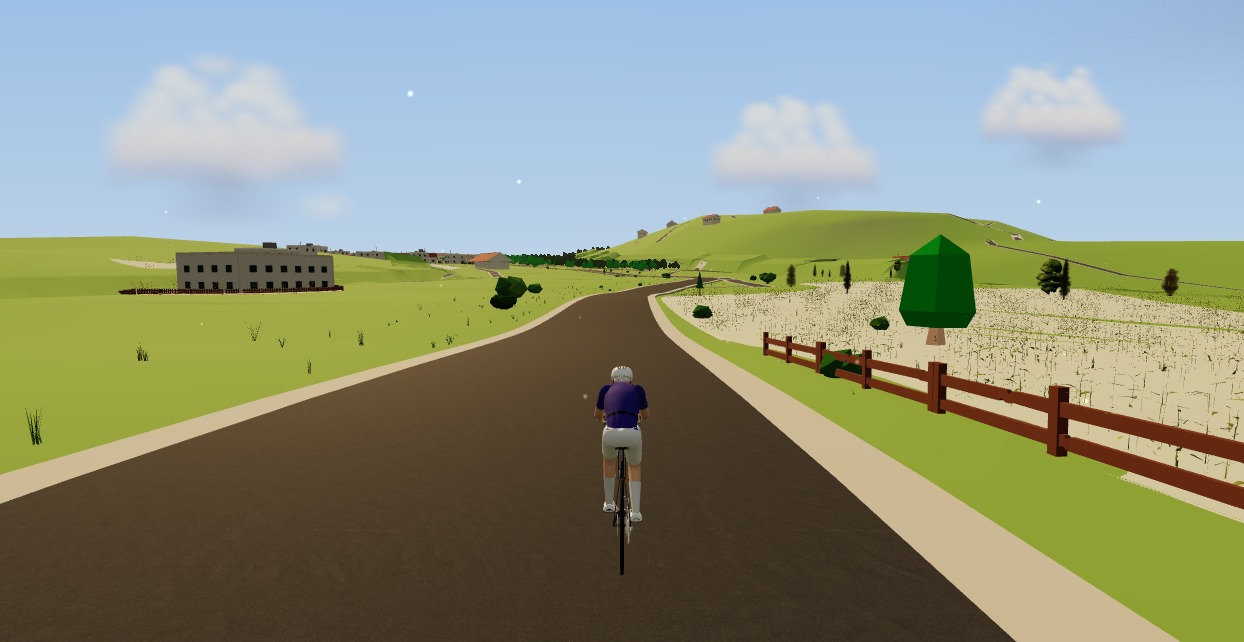
Lighter than a full game engine is not the same as weightless, and it would be dishonest to pretend otherwise. Moveee Indoor still renders a real 3D world — buildings, terrain, rivers, the lot — and a genuinely old or underpowered machine will run it more modestly than a new one. You might see the scenery settle a beat behind you, or need to ease the detail back. What you won't lose is the ride itself: the road, the gradient driving your trainer, and every one of your numbers stay exactly as accurate on a humble laptop as on a fast one.
Getting it smooth on a modest laptop
If your machine is on the older or lighter side, a few small habits make the difference between a stuttery ride and a smooth one:
Use Chrome or Edge, kept up to date
The browser is your graphics engine here, so a current Chromium build genuinely helps. Safari and Firefox can't pair a trainer anyway.
Close the other tabs
A dozen open tabs each hold memory and steal a slice of the processor. Give the ride the machine to itself for the hour.
Plug the laptop in
On battery, most laptops quietly throttle the graphics to save power. Mains power lets it run at full pace — and you're not going anywhere.
Turn the settings down if it stutters
A lighter graphics setting keeps the ride smooth on a modest machine. You lose a little scenery detail, not the road, the gradient or your numbers.
Let the world load before you sprint
The scenery streams in around your route as you warm up. Give it the first minute and it settles.
If it runs Chrome or Edge, it can run a real-roads cycling world. No graphics card, no 30GB download, no gaming budget — just the everyday laptop you already own, a smart trainer over Bluetooth, and a tab. Chromebooks included; see indoor cycling on a Chromebook.
None of this makes the big-budget games worse — they're impressive, and if you own the machine for them, enjoy them. It's a question of what your hardware rules in or out. If yours has been quietly ruling you out of virtual cycling, a browser world changes the maths entirely. Our comparison of browser versus installed indoor apps lays out the wider trade-offs.
Open Moveee Indoor in Chrome or Edge, pair your trainer over Bluetooth, and ride one of your own routes rendered in 3D — on the laptop that's already in front of you. It's free while in alpha, there's nothing to install, and the ride counts toward your Moveee plan just like a ride outdoors. The best machine for virtual cycling is often the one you already have.
Sources 5
Where this article summarises a study, the study itself is linked — not a write-up of it.
- 1 WebGL Overview · The Khronos Group · 2024
- 2 Web Bluetooth (Draft Community Group Report) · W3C Web Bluetooth Community Group · 2024
- 3 Web Bluetooth API — browser compatibility · MDN Web Docs (Mozilla) · 2024
- 4 Customize the Windows performance power slider · Microsoft Learn · 2024
- 5 Copernicus DEM – Global and European Digital Elevation Model · Copernicus Data Space Ecosystem (ESA) · 2024
See this in your own numbers
Moveee builds your power curve, fitness and fatigue from every ride you upload, and writes a training plan around them. It is free, it takes one Strava connection, and it will tell you more about your riding in a week than any article can.
Start freeKeep reading
A Zwift alternative that runs in your browser — no download, no install
If you want the Zwift experience without the 12 GB download, the launcher and the gaming PC, the answer now runs in a browser tab. Here's how a no-install alternative works — and where it doesn't.

A free app for the Zwift Hub and Zwift Ride (yes, without Zwift)
Zwift's own trainers speak the same standard Bluetooth as everyone else's — which means a Zwift Hub or Zwift Ride works perfectly well without a Zwift subscription. How to pair Zwift hardware with a free browser app, what works (ERG, resistance, power), and the honest caveats around buttons and firmware.

How to use your Wahoo KICKR without Zwift (a free browser app)
Your Wahoo KICKR doesn't need Zwift — or any subscription — to give you a proper session. Here's how to use a KICKR (or KICKR Core, Snap and Move) with a free browser app that controls resistance, holds ERG targets and saves to Strava.

What a browser-based cycling app can — and can't — do in 2026
Browsers grew up. They can now pair your trainer, render a 3D world and save a ride with full power data. But a few things still belong to native apps. An honest capabilities audit.

Choosing a bike computer: what actually matters
Easy to overspend on capabilities you will never use, equally easy to buy the cheapest and be quietly annoyed for three years. Three tiers described honestly, the five specifications that matter, and the feature set that is mostly marketing.

The screen in front of your trainer
Riders spend a fortune on trainers and nothing on what they look at, then wonder why an hour indoors feels longer than three outside. It is an ergonomics problem before it is a hardware one — and sweat is the part that kills laptops.
A free MyWhoosh alternative that rides your own real routes
MyWhoosh proved indoor cycling can be free. If you want a free MyWhoosh alternative that rides your own real roads instead of a fictional world — and runs in the browser with nothing to install — here's the honest comparison.

Zwift on iPad? A browser alternative for tablets that actually works
Searching for Zwift on iPad — or a lighter tablet alternative? Here's the honest state of indoor cycling on tablets in 2026: what works on an Android tablet in the browser, the real iPad Bluetooth catch, and the simplest setups that just work.
Turn a dumb trainer smart with a power meter and your browser
You don't need to buy a smart trainer to train with power indoors. Here's how to turn a dumb trainer smart with a power meter (or speed sensor) and a free browser app — including how virtual power fills the gap if you have neither.
Can you really train indoors in a browser? How Moveee Indoor works in 2026
"In the browser" used to mean toy-grade. Not any more. Here's how a browser now pairs your trainer, holds your watts and renders a real 3D world — and what still needs a native app.

How to record an indoor ride to Strava (without Zwift)
An indoor ride should count. Here's how to record an indoor ride to Strava with full power, cadence and heart-rate data — without Zwift — using a free browser app that saves the ride even if your connection drops.

How long does it take to get cycling fit? A realistic timeline
Two weeks until rides stop feeling awful, six to eight until the numbers move, a season until club runs feel comfortable, years until the engine matures. An honest milestone-by-milestone timeline of cycling fitness — what genuinely speeds it up, what doesn't, and why coming back is faster than starting.